


Magic Poser - Art Pose Tool
2.85.22K Reviews
App Specs
- Version
- 3.1
- Updated On
- License
- Free
- Downloads
- 5,000,000+
- Developer
- Wombat Studio, Inc.
- Categories
- Art & Design
- Platform
- Android, iOS
Screenshots


 Analysis by AppCompare
I look at a posing app less as a place to make finished art and more as a small studio for answering practical drawing questions: where does the weight sit, what does a bent arm look like from below, and how does a change in viewpoint alter a silhouette? That is the role Magic Poser - Art Pose Tool aims to fill. It is a free art and design app from Wombat Studio, Inc., with optional in-app purchases ranging from $0.99 to $14.99 per item. Its Teen content rating is worth noting for younger users and families.
A reference tool, not a shortcut to finished art
The useful thing about building a pose in 3D is that I can adjust a figure instead of searching through photographs until I find almost the right gesture. A model can be turned to test a shoulder angle, a hand position, or the overlap between two bodies. That makes the app most valuable at the sketching stage, when a quick visual answer can prevent a drawing from becoming stiff or anatomically confusing.
I would not treat the resulting scene as a finished illustration. A posed model gives a starting point, but it does not decide what to emphasize, how to simplify anatomy, or how to make a character feel expressive. I still need to interpret the reference and draw with intention. That distinction matters: the app can shorten the search for a pose, but it cannot replace observation or personal style.
Where it fits among drawing references
Compared with a pose photo or a general image search, a manipulable figure has a clear advantage when I need a specific camera angle or a small change in posture. A photo gives authentic anatomy and natural detail, but I cannot rotate the person in it. A 3D posing tool lets me control the viewpoint and joints, although its model may feel less natural than a real person. I see the two approaches as complements rather than rivals: use a model to solve composition and viewpoint, then consult life or photo references when subtle anatomy and believable gesture matter.
It also differs from drawing directly in a painting app. A painting app is better for making marks, refining linework, and completing an image; Magic Poser is for arranging a reference scene before or alongside that work. If I already have a clear pose in mind, opening a separate tool may slow me down. If I am stuck on how a figure should turn or how two characters should occupy the same space, the 3D setup is more useful than repeatedly redrawing guesses.
A practical workflow for a short drawing session
For a quick character sketch, I would begin with a pose close to the action I need rather than trying to build every joint position from scratch. I would then adjust the most important features first: the torso’s direction, the balance between the legs, and the position of the arms. Only after the overall gesture reads clearly would I spend time on smaller adjustments. This order keeps a reference session focused and avoids polishing details on a pose that does not work as a silhouette.
A useful check is to orbit the camera before settling on a view. A pose that looks convincing from the front can become hard to read from a three-quarter angle, or an arm may disappear behind the torso. Checking more than one viewpoint helps me catch those problems early. I would also keep the scene simple when the goal is a single figure study; adding extra elements can distract from the body mechanics I am actually trying to understand.
Worth Reading Before You Choose

Flipboard Shows What News Apps Must Do Beyond the Feed

Switching to Android Auto Means Rethinking Your Driving Routine

Google Calendar Makes a Crowded Week Easier to Manage

Ludo King Makes the Most of the Minutes Between Plans

Baby Panda World Brings Quick Play to Modern Phones, but Its Game Library Feels Busy

ESPN’s Live Game View Makes Following Close Games Easier
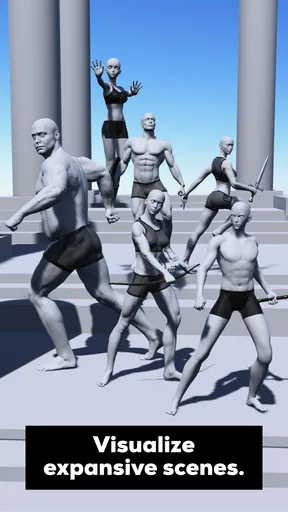
For a comic panel with two characters, I would use the scene to test spacing and interaction before drawing. The key question is not whether both models look perfect, but whether their gestures communicate the relationship: are they facing each other, reaching, avoiding contact, or sharing the same space? A rough pose arrangement can reveal an awkward composition before I commit to detailed linework. This is a particularly good use for a 3D tool because moving one figure can change the whole panel’s balance.
Who is likely to get the most from it
Magic Poser makes the most sense for illustrators, comics artists, and art students who regularly need pose references and are comfortable adjusting a digital model. Beginners may find it helpful as a way to examine how a body changes when viewed from different angles, as long as they use it to support drawing practice rather than trace every result. More experienced artists can use it as a fast block-in aid when a pose is difficult to picture mentally.
I would skip it if my main goal were to paint or edit finished images in one place, or if I preferred the organic variety of live models and photography. It is also a poor fit for someone who wants every reference to look naturally spontaneous without any setup. A 3D figure is a controlled guide, and that control is also its limitation: it can help arrange a body, but it may not capture the small asymmetries and accidental gestures that make real movement feel alive.
Getting Started: First Impressions
Upon launching the app, you're greeted with a clean and intuitive interface. It doesn't bombard you with excessive features right off the bat, which is a relief. The app seems to know that its users appreciate simplicity. Setting up your first pose is straightforward, making it easy for both beginners and seasoned artists to get started without a hitch.
The Core Features
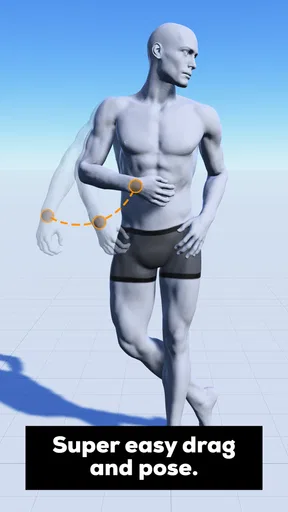
Magic Poser offers a robust set of tools to bring your creative vision to life. You can manipulate 3D models of humans, animals, and even dynamic objects with astonishing ease. The drag-and-drop functionality feels smooth, and the ability to adjust lighting and shadows adds a layer of realism that's often missing in other apps.
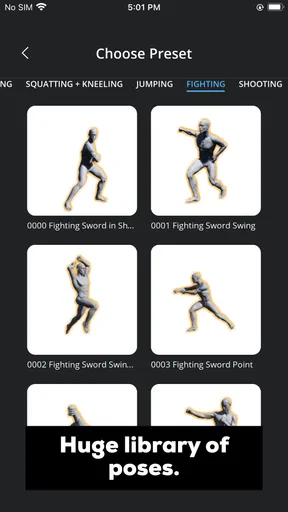
One feature I particularly enjoyed was the vast library of pre-made poses. If you're ever stuck in a creative rut, this library can kickstart your imagination. You can modify these poses to suit your needs or use them as they are. It's a fantastic way to save time while maintaining creative control.
Customizability and Control
The app shines in its customizability. You have control over every joint and limb, allowing for precise adjustments. This level of detail is invaluable for artists who need to capture specific angles and postures. The camera controls are intuitive, giving you the freedom to view your model from any angle, a feature that can significantly enhance your workflow.
For a more deliberate adjustment process, I would change one major joint at a time and then inspect the figure from the side as well as from the chosen drawing angle. A pose can look fine in the main view while the spine or hip position feels awkward in profile. This small extra check helps me avoid using a visually tidy but physically confusing reference. It is also a good reason not to chase tiny finger or limb refinements too early: the broad gesture has to work first.
Lighting and shadows can help clarify the form, but I would use them as a reading aid rather than assume they make the model anatomically realistic. A strong shadow may make a shape easier to separate, while a different light direction can expose where forms overlap. For a line drawing, I would prioritize a clear silhouette and camera angle; for a value study, I would spend more time checking how the light separates the torso and limbs. The best setup depends on what I plan to learn from the reference.
Usability and User Experience
One of the standout aspects of Magic Poser is its user-friendly nature. It doesn't take long to learn the ropes, and the app's responsiveness makes the experience even more enjoyable. The learning curve is surprisingly gentle, and the developers have done an excellent job of balancing functionality with ease of use.
Moreover, the app's performance is worth mentioning. It runs smoothly on both Android and iOS devices, with minimal lag or crashes. This stability is crucial, especially when you're in the middle of a creative flow and can't afford interruptions.
The main practical trade-off is that joint-by-joint control asks for patience when I have a very specific pose in mind. A preset can give me a useful starting direction, but fine adjustments still take attention, especially if I am trying to make several body parts communicate one clear action. On a phone, I would work in short passes: establish the pose, check the camera, then refine only the parts that affect readability. That is less frustrating than expecting a complex scene to fall into place in one continuous adjustment session.
For an everyday example, imagine I have ten minutes before sketching a character leaning over a table. I can start from a nearby pose, turn the view until the lean reads, and adjust the arms so they appear to rest on the surface rather than float beside it. I then draw from the reference while simplifying the forms in my own style. The scene is doing a narrow job—answering a question about posture and perspective—so I do not need to spend the session trying to make it look like a polished illustration.
Additional Tools and Resources
Beyond posing, the app offers additional resources like tutorials and guides, which are a boon for anyone looking to refine their skills. These resources are well-crafted and cover a range of topics, from basic pose setups to more advanced techniques. It's like having a personal art instructor right in your pocket.
When I am learning a new movement, I would use a tutorial or guide as a prompt to practice rather than as a reason to follow one exact recipe. I can build a reference, draw it once, and then change the camera or one joint to see how that alters the gesture. Comparing those versions is more instructive than simply copying a single result, because it makes the relationship between pose and viewpoint visible.
The app is free to install, but its in-app purchases are a reason to pause before buying anything. I would first test whether the free experience covers the kind of posing I actually do, then consider a purchase only if a specific option solves a recurring problem. The listed purchase range runs from $0.99 to $14.99 per item; I would not treat spending as a prerequisite for learning whether the workflow suits me.
Community and Support
The community aspect of Magic Poser is another highlight. You can connect with other artists, share your creations, and get feedback. This sense of community is encouraging and can be a great source of inspiration. Additionally, the support team is responsive, which is always a plus.
On the trust side, I prefer to distinguish between what I can see while using an app and what I would need to check in its current store and privacy materials. I do not assume particular permissions, data practices, or account controls without verifying them. Before sharing a scene or signing into any service, I would read the prompts presented at that moment and decide whether the choice is necessary for my own use. The practical point is simple: pose-building can be useful on its own, so I would only share work when I actually want feedback or community participation.
The same caution applies to any reference material I make for personal projects. I would avoid putting identifying details into a scene or public post unless they are essential, and I would review the audience and sharing choice before publishing. That is not a claim about a specific privacy setting; it is a sensible habit whenever creative work moves beyond the device. If privacy is a deciding factor for you, check the app’s current disclosures and the controls visible in your version before relying on it for sensitive material.
Choosing it with realistic expectations
The app has a substantial audience, with over five million installs, but its average rating is 2.4 from around 62,000 ratings and about 5,200 written reviews. I take that contrast as a reason to try it for my own workflow rather than assume popularity means universal satisfaction. Its current version is 3.1, and it was released on February 8, 2018; it requires Android 9 or later on Android devices.
That rating makes it especially important to judge the app against a concrete task. I would test a simple pose, rotate the camera, and see whether the controls feel comfortable on my device before building a complicated scene. If that first experiment feels fiddly, a photo reference or a quick pencil thumbnail may be faster. If I enjoy adjusting a 3D figure and often need a precise view, the same learning effort may pay off across many drawings.
For younger artists, the Teen rating is a useful point to consider, while families should still make their own decision about the app and any community use. For everyone, I would keep expectations modest: this is a specialist reference tool, not a complete art studio, anatomy course, or guarantee of realistic poses. It is most convincing when I ask it a focused question and then bring my own judgement to the drawing.
The Verdict: Is It Worth Your Time?
After spending quality time with Magic Poser, I can confidently say it's a must-have tool for digital artists. Whether you're a beginner looking to learn the basics or a professional needing a reliable reference tool, this app has something to offer. Its combination of features, usability, and community support makes it stand out in a crowded market.
So, if you're on the hunt for an app that can enhance your artistic workflow, give Magic Poser a try. It's got the potential to become your go-to reference tool, and you might just find yourself wondering how you ever managed without it.
Pros
- User-friendly interface for easy navigation.
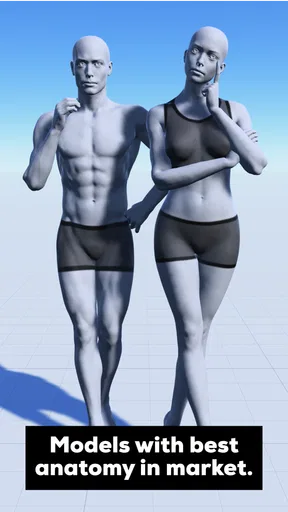
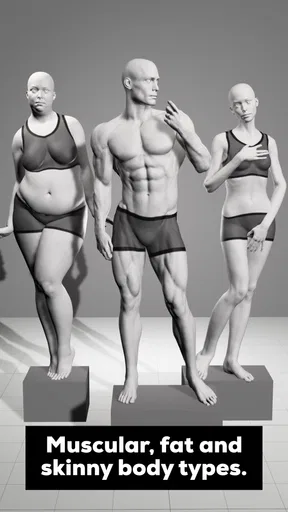
- Variety of models and poses available.
- Customizable lighting and shadows.
- Offline mode enhances accessibility.
- High-resolution export for detailed work.
Cons
- Limited free features without subscription.
- Occasional app crashes reported.
- Lacks advanced anatomy details.
- Ads can be intrusive for free users.
- In-app purchases can be pricey.
FAQs for Magic Poser - Art Pose Tool
What is Magic Poser and how does it work?
Magic Poser is a versatile art pose tool designed to help artists create realistic poses for their drawings. The app offers a variety of 3D models that users can manipulate to achieve the desired pose. With intuitive controls, you can adjust limbs, facial expressions, and even lighting to see how shadows fall on the model.
Is Magic Poser suitable for beginners?
Yes, Magic Poser is user-friendly and suitable for artists of all levels. Beginners will appreciate the app’s intuitive interface and the ability to experiment with different poses easily. The app also provides tutorials and tips that help users get started and make the most of its features.
What devices is Magic Poser compatible with?
Magic Poser is available for both Android and iOS devices. It is optimized to run smoothly on smartphones and tablets. Ensure your device meets the app’s system requirements for the best experience, which usually includes a certain amount of RAM and the latest OS version.
Are there any costs associated with using Magic Poser?
Magic Poser offers a free version with basic features. However, to unlock advanced tools, models, and customization options, users can opt for in-app purchases or a subscription plan. These paid options provide enhanced flexibility and more comprehensive resources for serious artists.
Can I export my poses from Magic Poser?
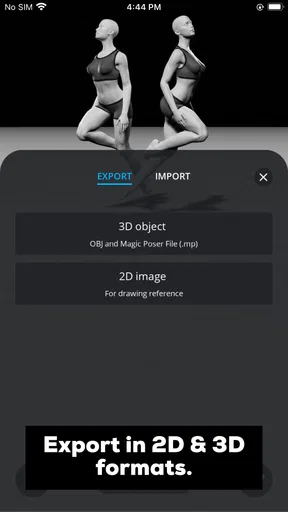
Yes, Magic Poser allows users to export their poses. You can save your creations as images, which are useful for reference in your artwork. The app supports various export options, letting you choose the resolution and format that best suits your needs for seamless integration into your creative process.


